Use the Getting started checklist and guided tours
The Getting started checklist walks you through PV0T's main features, one step at a time. Each step ticks itself off when you actually do it, and Show me takes you to the exact spot in the app.
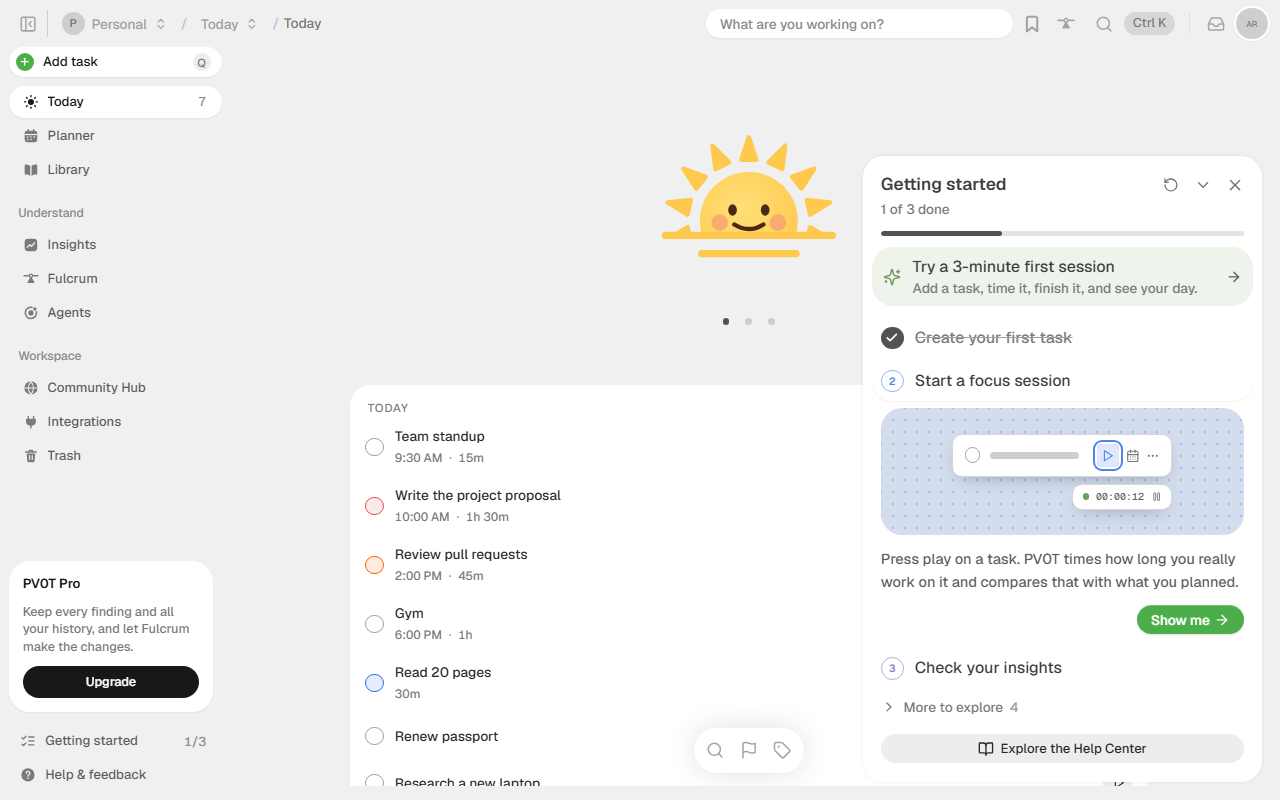
Open the checklist
- It appears in the bottom-right corner for new accounts.
- You can reopen it any time: click Getting started at the bottom of the sidebar, open Help & feedback → Getting started, or go to Community Hub → Discover.
The steps
- Create your first task.
- Start a focus session on it.
- Check your insights.
Under More to explore are the optional ones: Take a quick tour, Add a category, Review a distraction, Get the desktop app and Invite someone.
Click a step to see what it's about, then Show me to be guided there. Some steps unlock only after an earlier one: you can review a distraction once you've run a focus session.
Guided tours
Most pages have a short tour that points out what each part does. Open Help & feedback in the sidebar and choose Tour this page.
Good to know
- Minimize the checklist to a small progress pill, or hide it. Hiding it the first time stops it from popping up again on its own.
- Start over unticks the steps so you can go through them again.
- Prefer a quicker start? Try a 3-minute first session covers the task and focus-session steps in one go.
Related
Did this answer your question?